The young Switch 2 homebrew scene has its first full desktop web browser. On November 19, developer shodowlo published Chromium NX 0.2.0 on GitHub, and the headline feature is native Switch 2 support: a real build of Chromium 156 that runs as a homebrew app under kaiHEN, the homebrew environment released for the console a week earlier. It is one of the most demanding programs anyone has run on Nintendo’s new hardware outside of games, and a sign of how quickly developers are building on the small window that still exists. That window is narrow, though: everything here depends on a console that has never been updated past firmware 23.0.1.
What was released
Chromium NX started life as a fork of mnnobre’s lkl-switch project, which runs Linux as a library inside the Switch’s own operating system. Rather than rewriting Chromium for Nintendo’s platform, the project boots a small Linux userland inside a normal homebrew app and runs Debian’s Chromium package there, drawing to the screen through the host’s graphics stack. The browser image itself, a file called chromium-full.ext4, is about 411 MB and is shared between the original Switch and Switch 2 builds.
Version 0.2.0 ships two separate programs: chromium-nx.nro for the original Switch (running Atmosphère) and chromium-nx2.nro for the Switch 2. According to the release notes, the Switch 2 build:
- renders at 1080p and uses all six CPU cores available to it;
- draws through Zink, which provides OpenGL ES 3.2 on top of Vulkan, via the OunceVK graphics library from the ouncebrew devkit;
- lets a Joy-Con 2 be used as a mouse, with a pointer that stays smooth while pages load.
Both builds also gained Chromium 156.0.8078.79 with Debian’s latest security fixes, support for several sounds playing at once, USB keyboard input with modifier keys, a right-click menu on ZR, a working “Save link as” that writes to /switch/chromium-nx/Downloads on the SD card, and better handling of busy pages that previously closed the browser. OneJailbreak, which covered the release, confirmed the feature set and that the Switch 2 tests were done on firmware 23.0.1 with a mid-November kaiHEN build.
Which consoles and firmware it works on
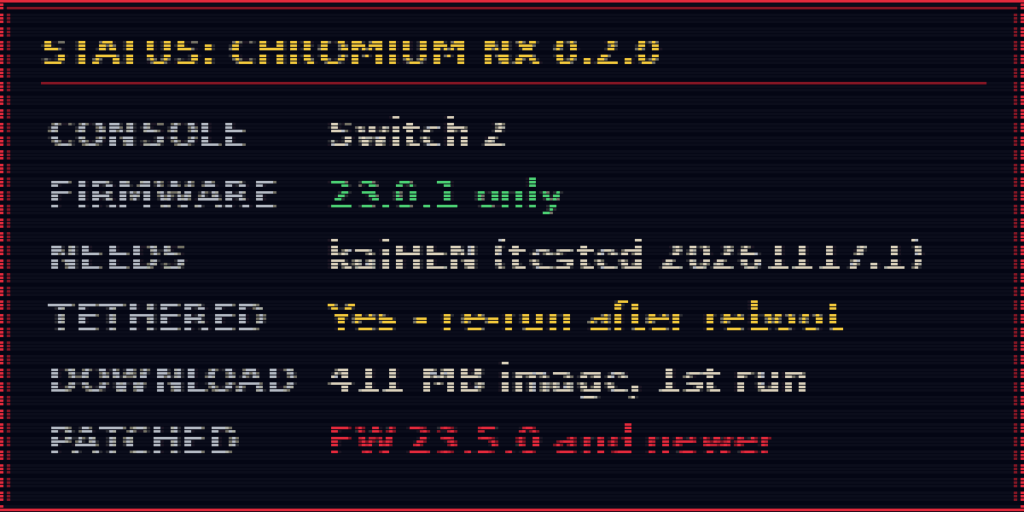
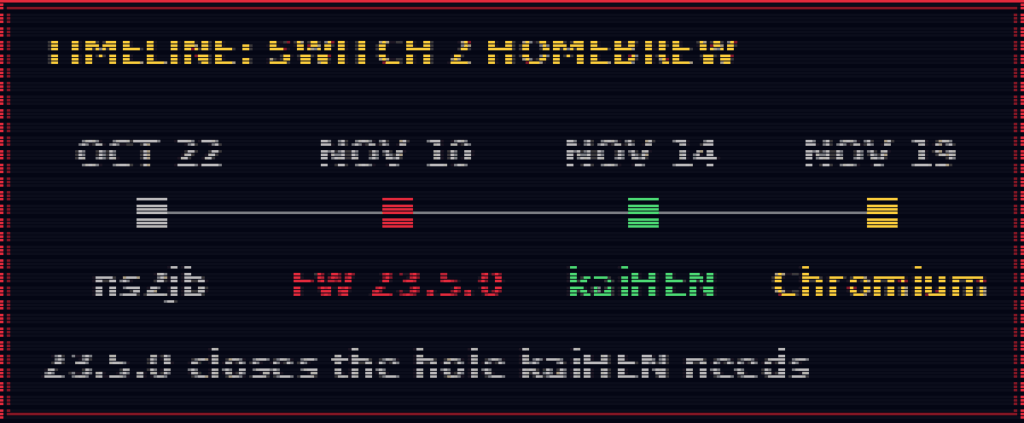
Chromium NX itself is just an app; the hard part is getting any unsigned code running on a Switch 2. That is kaiHEN’s job. Released on November 14 by kurumuz under the ouncebrew organisation, kaiHEN describes itself as “a homebrew environment and minimal custom firmware for Switch 2”. It loads a homebrew menu (hbmenu), runs .nro apps from the SD card, and gives them very broad access to the system, including the internal NAND storage.
kaiHEN has to be bootstrapped through a separate entry exploit, and all of those rely on the operating-system flaw first used by pepsipu’s ns2jb jailbreak in October. GBAtemp’s coverage lists two main entry points: kurumuz’s updated version of the SmileBASIC 4 exploit and a route through the Switch 1 cartridge version of Civilization VII. Both only lead anywhere on firmware 23.0.1. Nintendo’s firmware 23.5.0, released November 10, closed the system escape they depend on, and dataminer OatmealDome wrote on X that dumping and modding games would be “impossible again from this point forward” on that version.
The setup is also tethered: nothing is installed permanently, so after every reboot the entry exploit and kaiHEN have to be run again before Chromium NX can be opened.
How Nintendo has responded
Nintendo has not commented publicly on ns2jb, kaiHEN or any of the homebrew built on them. Its actions have been clear, though. SmileBASIC 4 disappeared from the eShop shortly after ns2jb surfaced, firmware 23.5.0 patched the underlying flaw, and since around November 12 users on 23.0.1 have reported that SmileBASIC 4 and Civilization VII refuse to start once the console has contacted Nintendo’s servers, asking for a system update first. Twisted Voxel credited that finding to Coxxs on X, and Wccftech carried similar reports. In practice, anyone hoping to use kaiHEN has to keep their console offline.
How to run it
Requirements
- A Nintendo Switch 2 on firmware 23.0.1 exactly. Consoles on 23.5.0 or newer cannot run kaiHEN, and there is no way to downgrade.
- A working kaiHEN setup, started with one of the entry tools described in the kaiHEN coverage (these need SmileBASIC 4 already installed, or the Switch 1 Civilization VII cartridge). The developer tested with kaiHEN 20261117.1.
- An SD card, and about 411 MB of free space for the browser image.
- Tethered: kaiHEN must be started again after every reboot.
Steps, as described in the Chromium NX release notes and the kaiHEN README:
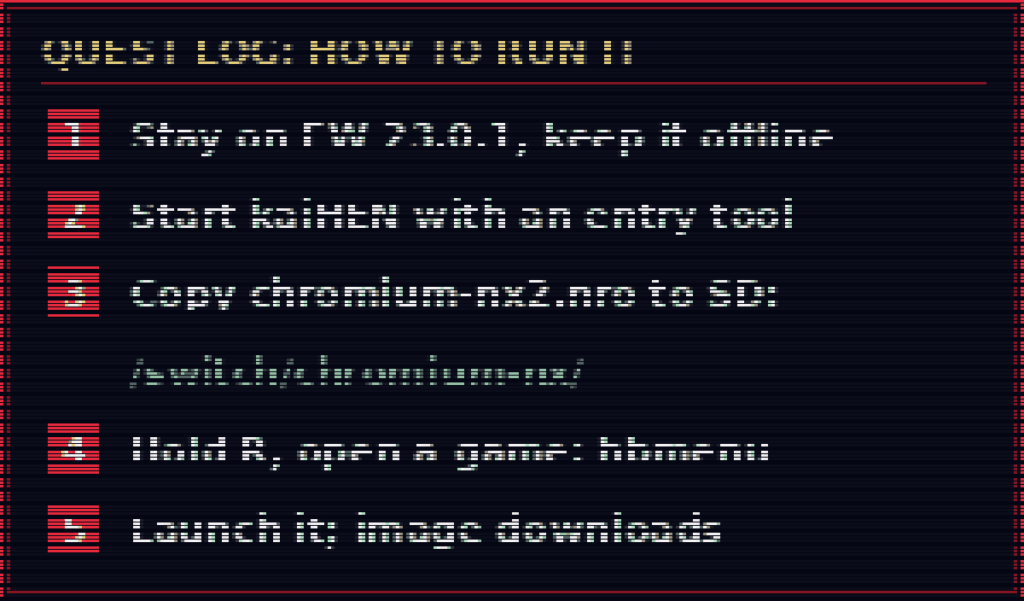
- Keep the console offline and on firmware 23.0.1, so it is not pushed to update and the entry games are not blocked.
- Start kaiHEN using your entry tool, following the instructions on the official kaiHEN page.
- Download
chromium-nx2.nrofrom the official Chromium NX 0.2.0 release on GitHub and copy it to/switch/chromium-nx/on the SD card. - Open hbmenu: with kaiHEN running, launch a native Switch 2 game while holding R. The README notes that the second launch onwards opens hbmenu.
- Start Chromium NX from hbmenu. On first run the launcher downloads
chromium-full.ext4(411 MB), or you can copy that file into the same folder yourself.
kaiHEN itself is available from its official ouncebrew GitHub repository, and GBAtemp’s kaiHEN release article lists the official entry-point projects.
Risks. This is early, experimental software. kaiHEN’s own README warns that it gives homebrew full access to the system NAND and that a malicious app “might write to your Switch 2 and brick it forever”. Connecting a modified console to Nintendo’s servers risks a forced update or a ban, and any system update will end access for good. Popular jailbreak tools are also routinely copied and repackaged with malware, so only download Chromium NX and kaiHEN from the official GitHub pages linked above.
What it means for ordinary owners
For most Switch 2 owners, nothing changes: if your console has updated to 23.5.0, none of this is available to you, and there is no reason to hold off on updates for a browser. For the smaller group who kept a console on 23.0.1 and offline, Chromium NX is a strong sign of how capable kaiHEN is. Alongside early ports of the Dolphin emulator, a proof-of-concept Eden emulator build and native homebrew games, a full Chromium build shows that the ouncebrew devkit can carry large, graphics-heavy software. Whether the scene grows beyond 23.0.1 depends on a new exploit appearing, and none has been confirmed so far.
Sources
- shodowlo/chromium-nx: Chromium NX 0.2.0 release notes (GitHub)
- ouncebrew/kaihen: README (GitHub)
- ouncebrew/kaihen: releases (GitHub)
- OneJailbreak: Chromium Browser Runs on Jailbroken Switch 2
- GBAtemp: KaiHen, Switch 2 homebrew environment released
- Wccftech: The First Nintendo Switch 2 Jailbreak Is Out Of Commission
- Twisted Voxel: Nintendo Is Reportedly Blocking Access To SmileBASIC and Civilization VII On Firmware 23.0.1
- Better Gaming: Can You Hack the Switch 2? Jailbreak Status by Firmware